
Understanding Kambi's Design Token Color Structure.
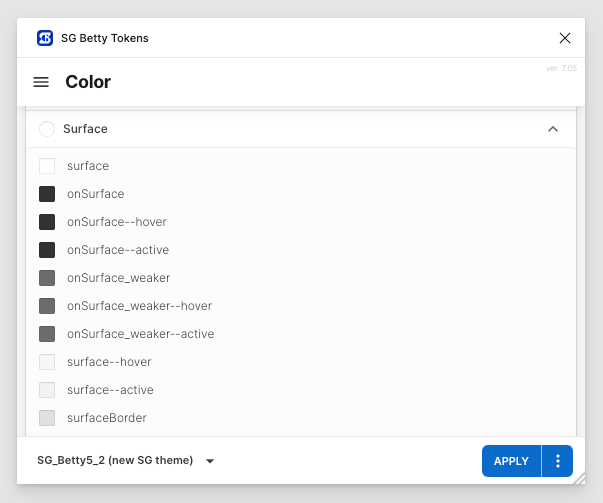
Semantic Color Tokens
Semantic tokens are a pivotal part of our design system. They are context-specific, meaning they are defined by their usage within the interface rather than by the color itself. This approach allows for greater flexibility and easier updates, as changes to the token definition automatically propagate throughout the product.
Color Token Sets
Our color tokens are organized into sets, each addressing a different aspect of the user interface. Currently, we have over 50 semantic color token sets. Each set comprises a base token and its variations to cover different interaction states. Let's explore the structure using the "Surface" token set as an example.
surface
This is the default background color used across various components.
surface--hover
This token defines the background color when a user hovers over a surface.
surface--active
This token is used for the background color when a surface is in an active state, such as being pressed or clicked.
onSurface
The default color for text and icons that are placed on a surface background.
onSurface--hover
The color for text and icons when the user hovers over them.
onSurface--active
The color for text and icons when they are in an active state, such as being pressed or clicked.
onSurface_weaker
A lighter color for secondary text on a surface background.
onSurface_weaker--hover
A lighter color for secondary text on a surface background in the hover state.
onSurface_weaker--active
A lighter color for secondary text on a surface background in active state.
surfaceBorder
This is a color used for borders on any side of a surface and for dividing lines on top of a surface.